Quickstart
This page is a recording, not a sketch. Every command was run in order on
2026-10-20 against the 0.1.0 wheel, in a fresh virtual environment with an
empty home directory, and the output is pasted as it came back. Only two
things were edited: the home directory is shown as ~, and one log line
from the test harness's own network bridge was removed. Your process IDs,
timings and model wording will differ. So will the agent list in step 4:
it includes one agent per coding-agent CLI installed on the machine.
0. What you need
- Python 3.10 or newer, and a virtual environment (see Install).
- An OpenAI-compatible endpoint and the id of a model it serves. That
can be a vLLM server on your own GPU (
vllm serve <model>listens onhttp://localhost:8000/v1by default), another local server, or a hosted API. The recording below used a vLLM server on the same machine, serving a model under the idqwen3.8-flash-next. Substitute your own endpoint and model id everywhere they appear. To list the ids a server offers, run:
curl -s http://127.0.0.1:8000/v1/models
1. Install
pip install "sharedcode[web]"
The [web] extra is only needed for step 5. The terminal UI and the
one-shot mode work with plain pip install sharedcode.
2. Point it at your endpoint
Running sharedcode with no arguments in a terminal starts an interactive
first-run wizard. To script the same thing, give configure the endpoint
and model:
$ sharedcode configure --endpoint http://127.0.0.1:8000/v1 --model qwen3.8-flash-next
  ✓ endpoint http://127.0.0.1:8000/v1 model qwen3.8-flash-next → ~/.sharedcode/config.json
  ✓ saved jarvis orchestrator → ~/.sharedcode/agents/jarvis/config.json

  ── Service ──
  ✓ gateway started (pid=17) → http://127.0.0.1:8100
    (background run — won't survive a reboot. For a boot service, run `sharedcode gateway install-service`.)
wrote global config → ~/.sharedcode/config.json
wrote per-agent config → ~/.sharedcode/agents/jarvis/config.json
That wrote the global config and the config of the default agent,
jarvis, and started the gateway and orchestrator in the background.
3. Ask something
$ sharedcode -p "In one sentence: what does a sovereign inference stack protect?"
  agent=jarvis gateway_pid=17 upstream=http://127.0.0.1:8000/v1 model=qwen3.8-flash-next (ok)
── thinking ──
The user is asking for a single-sentence response, which is straightforward and doesn't require any complex reasoning or additional context.


A sovereign inference stack protects an organization's (or nation's) control over its data, models, and compute — ensuring that prompts, outputs, weights, and serving infrastructure stay under its own jurisdiction, policy, and supply chain rather than a third-party provider's.
── qwen3.8-flash-next · ttft 217ms · prefill 156ms · 146.2 tok/s · 82 tok · wt 0.6s ──
The model's reasoning and the status lines go to stderr; only the answer
goes to stdout, so sharedcode -p "..." > answer.txt captures just the
answer.
For the full-screen terminal UI, run sharedcode with no arguments. In
this run it reopened the session from step 3, showed the turn with its
token and timing line, answered a follow-up, and quit on Ctrl+Q. Its
status bar read agent jarvis · mode: auto.
The default mode is auto
In auto mode the agent works autonomously and only pauses before
destructive actions. If you would rather approve each change, start
with sharedcode --ask. For read-only answers, use sharedcode --plan.
4. Look at the background services
$ sharedcode gateway status
orchestrator: running (pid=7) at http://127.0.0.1:8099
gateway: running (pid=17) at http://127.0.0.1:8100
  role:          gateway
  agents:        antigravity, build, codex, cursor, explore, general, jarvis, plan, shareddata
  live backends: antigravity, build, codex, cursor, explore, general, jarvis, plan, shareddata
$ sharedcode gateway stop
gateway stopped (pid=17)
orchestrator stopped (pid=7)
5. Run the whole stack with the web UI
sharedcode-serve (also python -m sharedcode.serve) brings up the
orchestrator, gateway and web UI together. --detach starts all three in
the background and returns:
$ python -m sharedcode.serve --detach
START orchestrator 8099 pid=41 url=http://127.0.0.1:8099
START gateway 8100 pid=51 url=http://127.0.0.1:8100
START web 8110 pid=63 url=http://127.0.0.1:8110
$ python -m sharedcode.serve status
PASS orchestrator 8099 tcp=PASS http=200
PASS gateway 8100 tcp=PASS http=200
PASS web 8110 tcp=PASS http=200
The web UI has no sign-up page by design. Create the first account from the command line. The first account becomes the admin:
$ sharedcode-web --create-user you@example.com
password:
confirm password:
created native web user: you@example.com (display name: you, role: admin)
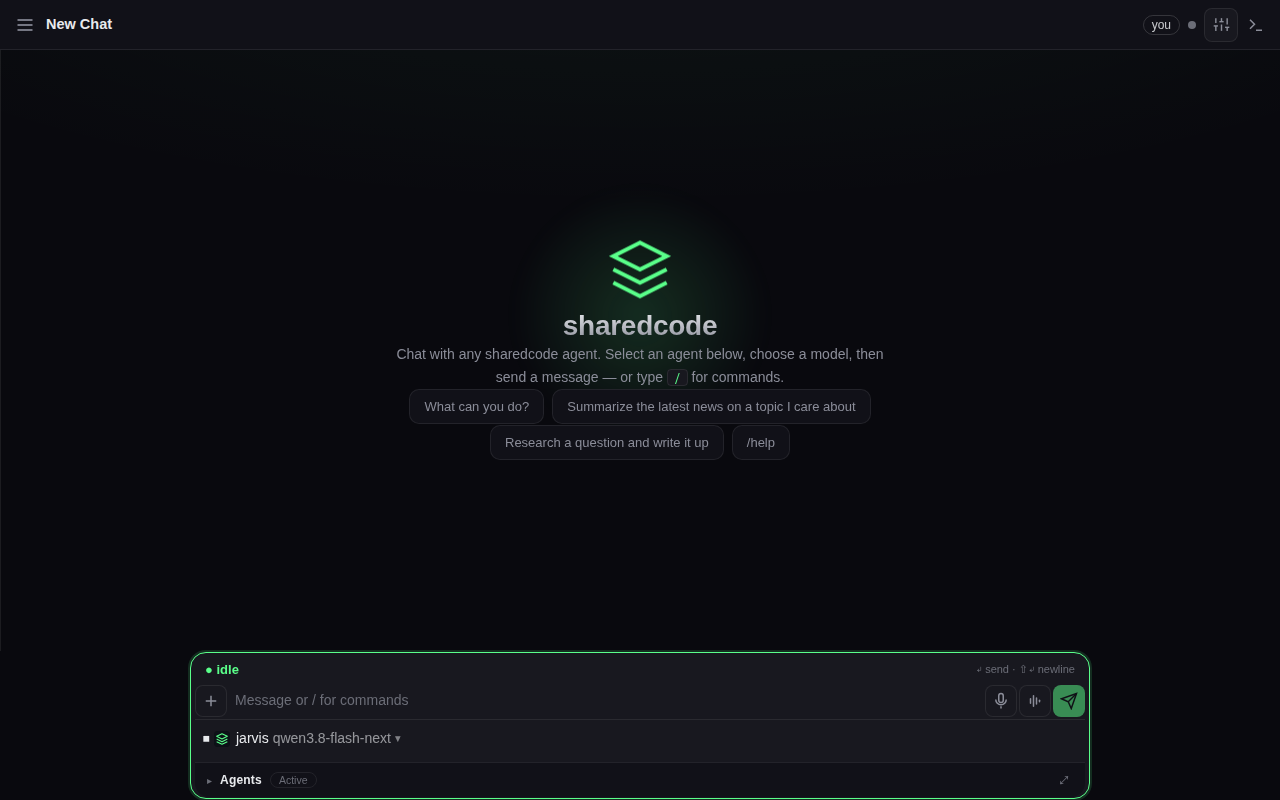
Open http://127.0.0.1:8110, sign in with that address and password,
and you land on a new chat with your agent and model already selected:
6. Check health, then stop
$ sharedcode doctor --health
sharedcode health

  gateway   OK    http://127.0.0.1:8100/health                                                                                 reachable
  upstream  OK    http://127.0.0.1:8000/v1                                                                                     HTTP 200; model=qwen3.8-flash-next (served)
  errors    OK    ~/.sharedcode/errors  0 open error(s)

all critical checks OK
$ python -m sharedcode.serve stop
STOP web pid=63 was_running=True
gateway stopped (pid=51)
orchestrator stopped (pid=41)
STOP orchestrator/gateway rc=0
$ python -m sharedcode.serve status
FAIL orchestrator 8099 tcp=FAIL http=000
FAIL gateway 8100 tcp=FAIL http=000
FAIL web 8110 tcp=FAIL http=000
status exits with code 0 when every component passes and 1 otherwise,
so it works as a health check in scripts.
Without --detach, python -m sharedcode.serve stays in the foreground:
it prints the same START lines, mixed with each component's own log, then
WebUI http://127.0.0.1:8110. Ctrl+C stops all three.
Where to go next
- Configuration: what those config files contain, and how to add more models.
- Operations: services that survive a reboot, logs, memory maintenance and the worker pool.